
Rendering with our powerful API
Everything the Generate PDF page does in the browser, the API does programmatically, with more control, lower overhead, and the same rendering engine underneath. A single POST request renders a report, optionally logs the result, and optionally dispatches a print job, all in one call.
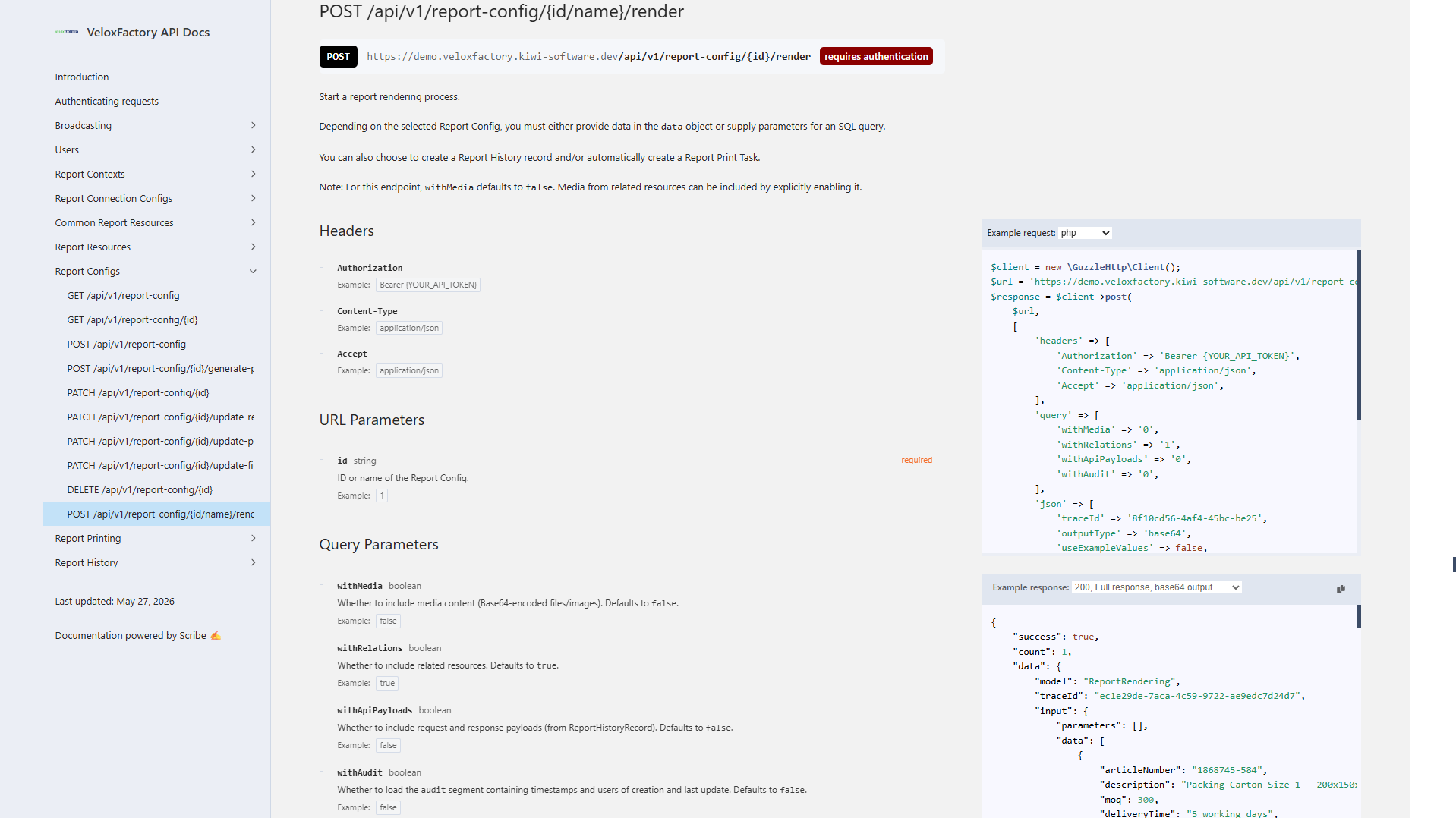
The Render Endpoint
POST /api/v1/report-config/{id}/render
The {id} segment accepts either the numeric ID of the ReportConfig or its report name, the name set in Jaspersoft Studio and stored in VeloxFactory. Both of these are equivalent:
POST /api/v1/report-config/1/render
POST /api/v1/report-config/A5_KanBan/render
Using the report name is convenient for integrations: it stays stable even if the database record is recreated, and it makes the request self-documenting.
Request Body
| Field | Type | Required | Description |
|---|
outputTypebase64, url, or none. See below.parametersresourceOverridesobjectPer-render override for P_RESOURCE_* image parameters, keyed by parameter name. See Dynamic Resource Overrides below.
datacreateHistoryRecordReportHistoryRecord for this render. Stores the full request, response, and rendered PDF.createPrintTaskprinterNamecreatePrintTask is true.numberOfCopies1. VeloxFactory always renders once, the print service handles duplication.broadcastIdReportPrintTaskCreated event when the print task is created. Omit to rely on polling.useExampleValuesparameters and data. Useful for testing. API-only - not available in the frontend. See below.laconicResponsetraceIdDynamic Resource Overrides
Every P_RESOURCE_* image parameter (a logo, a product photo, a line-art reference) normally resolves to whichever file is uploaded or linked on the ReportConfig itself. resourceOverrides lets a single render request swap that image out, without touching the report configuration, useful for per-customer branding, per-item product photos, or any other case where the image genuinely varies from call to call.
POST /api/v1/report-config/A4_AssemblyBOM/render

{
  "outputType": "base64",
  "parameters": { "P_PROJECT_NUMBER": "PRJ-2026-0417" },
  "resourceOverrides": {
    "P_RESOURCE_ASSEMBLY_IMAGE": { "path": "https://cdn.example.com/parts/4471.png" }
  },
  "createHistoryRecord": false,
  "createPrintTask": false
}
resourceOverrides is an object keyed by resource parameter name. Each entry supports exactly one of two modes:
pathstringA local filesystem path readable by the VeloxFactory server, or an http(s):// URL. Remote URLs are fetched directly by the render engine at render time.
base64stringBase64-encoded image bytes. VeloxFactory decodes them, writes a temporary file for the duration of the render, and deletes it immediately afterward.
fileNamestringOptional, used only alongside base64 to infer the file extension.
Base64 example:
{
  "outputType": "base64",
  "resourceOverrides": {
    "P_RESOURCE_ASSEMBLY_IMAGE": {
      "base64": "iVBORw0KGgoAAAANSUhEUgAA...",
      "fileName": "part-4471.png"
    }
  },
  "createHistoryRecord": false,
  "createPrintTask": false
}
ReportConfig before it can be overridden. resourceOverrides replaces the resolved path for a single render, it does not exempt a P_RESOURCE_* parameter from needing a default resource in place. Rendering still fails with the usual "Not all resources for this report have been uploaded yet!" error if no file or CommonReportResource is linked at all.
parameters and resourceOverrides. VeloxFactory rejects the request with a 422 if a key appears in both, to avoid ambiguous precedence.
{
  "success": false,
  "errors": ["Parameter 'P_RESOURCE_LOGO' is set in both 'parameters' and 'resourceOverrides' - use only one."],
  "status": 422
}
Other validation errors follow the same pattern: an unknown resource parameter name, a path that cannot be read, or invalid base64 all return a descriptive 422 rather than failing deep inside the render engine.
Output Types
The outputType field controls how, or whether, the rendered PDF is returned.
base64: The PDF is Base64-encoded and returned inline in output.reportPdfBase64. No file is written to disk. This is the most common choice for integrations that process the PDF immediately.
url: The PDF is saved to the VeloxFactory history storage and a URL pointing to that file is returned in output.reportUrl. Useful when the calling application needs to hand off a link rather than handle raw bytes.
none: No PDF data is returned at all. Valid only when createPrintTask is true, the PDF is rendered internally and handed to the print service without being exposed in the response. Use this when the response payload is irrelevant and you only care about getting the document to the printer.
outputType: none requires createPrintTask: true. Requesting output type none without a print task is rejected with a validation error, there would be nothing to do with the rendered PDF.
useExampleValues - API-only Testing Mode
When useExampleValues: true is set, VeloxFactory ignores any parameters and data in the request body and instead uses the example values stored on the ReportConfig. This is the same data used to generate the report preview in the frontend.
It is a convenient way to verify that a report renders correctly after configuration changes, no test data needs to be assembled:
POST /api/v1/report-config/A5_KanBan/render

{
  "outputType": "base64",
  "useExampleValues": true,
  "createHistoryRecord": false,
  "createPrintTask": false
}
useExampleValues is an API-only feature. The Generate PDF page in the browser always requires parameters and data to be entered manually. For frontend testing, use the example values from the report configuration edit page.
laconicResponse - Minimal Output
By default, a successful render response includes the full ReportConfig record, the input parameters and data echoed back, and any linked ReportHistoryRecord and ReportPrintTask. For many production integrations, this detail is unnecessary, the caller only needs the PDF.
Setting laconicResponse: true strips the response down to the essentials: just the traceId and the output block. Everything else (input, reportConfig, reportHistoryRecord, reportPrintTask) is omitted.
The two response shapes are shown in detail in the Response Structure section below.
reportMeta in error responses. If a render fails in laconic mode, the error response contains only the error messages, the field and parameter metadata is not included.
A Complete Request
Here is a full render request for a KanBan label, dynamic array data, a parameter, history logging enabled, print task dispatched via WebSocket:
POST /api/v1/report-config/A5_KanBan/render

{
  "outputType": "base64",
  "parameters": {
    "P_ARTICLE_NUMBER": "4561287-154"
  },
  "data": [
    {
      "articleNumber": "4561287-154",
      "description":   "Packing Carton Size 1 - 200x150x50mm",
      "moq":           250,
      "deliveryTime":  "3 Days",
      "supplier":      "Ninghao Packaging",
      "barcode":       "5698532145712"
    }
  ],
  "createHistoryRecord": true,
  "createPrintTask": true,
  "printerName": "WarehousePrinter01",
  "numberOfCopies": 1,
  "broadcastId": "Standard",
  "laconicResponse": false
}
Response Structure
Full Response
The full response (default, laconicResponse: false or omitted) includes the rendered output, the echoed input, the full ReportConfig snapshot, and any created ReportHistoryRecord and ReportPrintTask:
{
  "success": true,
  "count": 1,
  "data": {
    "model": "ReportRendering",
    "traceId": "ec1e29de-7aca-4c59-9722-ae9edc7d24d7",
    "input": {
      "parameters": { "P_ARTICLE_NUMBER": "4561287-154" },
      "data": [
        {
          "articleNumber": "4561287-154",
          "description":   "Packing Carton Size 1 - 200x150x50mm",
          "moq":           250,
          "deliveryTime":  "3 Days",
          "supplier":      "Ninghao Packaging",
          "barcode":       "5698532145712"
        }
      ]
    },
    "output": {
      "reportPdfFileName": "a7dd0ea5-85fd-481c-998b-fa9819c2e84c.pdf",
      "reportPdfBase64":   "JVBERi0xLjQ..."
    },
    "reportConfig": {
      "model": "ReportConfig",
      "id": 1,
      "name": "A5_KanBan",
      ...
    },
    "reportHistoryRecord": {
      "model": "ReportHistoryRecord",
      "id": 4,
      "traceId": "ec1e29de-7aca-4c59-9722-ae9edc7d24d7",
      "outputType": "Base64",
      "status": "Ok"
    },
    "reportPrintTask": {
      "model": "ReportPrintTask",
      "id": 4,
      "traceId": "ec1e29de-7aca-4c59-9722-ae9edc7d24d7",
      "broadcastId": "Standard",
      "printerName": "WarehousePrinter01",
      "numberOfCopies": 1,
      "status": "Pending",
      "errorMessage": null
    }
  },
  "meta": [],
  "status": 200
}
Laconic Response
With laconicResponse: true, the response contains only what is needed to retrieve the PDF:
{
  "success": true,
  "count": 1,
  "data": {
    "model": "ReportRendering",
    "traceId": "555d073b-a630-4096-acd1-643b85ed5cc9",
    "output": {
      "reportPdfFileName": "8de016b5-4cf9-423a-9575-8c3155e35410.pdf",
      "reportPdfBase64":   "JVBERi0xLjQ..."
    }
  },
  "meta": [],
  "status": 200
}
The traceId is always included, it links this render to any created history record or print task, making it useful for cross-referencing even in laconic mode.
Errors
Validation Errors - HTTP 422
Missing required fields, an invalid outputType value, or a missing printerName when a print task is requested all produce a 422 response with an errors array describing the violations.
Required parameters that are not present in the request also return a 422, one error message per missing parameter:
{
  "success": false,
  "errors": [
    "Parameter P_DATE_FROM is required.",
    "Parameter P_DATE_TO is required."
  ],
  "meta": { "traceId": "..." },
  "status": 422
}
Render Errors - HTTP 400
If the request passes validation but the renderer itself fails, for example an empty data array for a report with a detail band, a type mismatch between field values and declared Java types, or a broken SQL query, the response comes back with HTTP 400 and a success: false payload.
In full (non-laconic) mode, a reportMeta block is included in the meta object alongside the traceId. This snapshot lists the report's fields, parameters, and resources at the time of the failure, useful for diagnosing mismatches between the request payload and what the report actually expects:
{
  "success": false,
  "errors": [
    "No data delivered (or fetched via SQL using parameters) while data deliverance is mandatory for reports with detail bands."
  ],
  "meta": {
    "traceId": "08deac82-274d-4f56-b9d0-d9fdb6280f8f",
    "reportMeta": {
      "resourceList": [
        { "parameterName": "P_RESOURCE_LOGO", "fileName": "Logo_Dark.png" }
      ],
      "parameterList": [
        { "parameterName": "P_ARTICLE_NUMBER", "dataType": "java.lang.String" }
      ],
      "fieldList": [
        { "fieldName": "articleNumber", "dataType": "java.lang.String" },
        { "fieldName": "description",   "dataType": "java.lang.String" },
        { "fieldName": "moq",           "dataType": "java.lang.Integer" },
        { "fieldName": "deliveryTime",  "dataType": "java.lang.String" },
        { "fieldName": "supplier",      "dataType": "java.lang.String" },
        { "fieldName": "barcode",       "dataType": "java.lang.String" }
      ]
    }
  },
  "status": 400
}
If a ReportHistoryRecord was requested (createHistoryRecord: true), it is still created even when the render fails, the error is recorded in the history entry, which makes it possible to review failed renders from the frontend alongside successful ones.